If you sell outdoor gear, beauty, supplements, home goods, or fitness products, and your AOV is above $50, YouTube Shopping is structurally your channel. These are the categories where customers watch a review before buying, and that behavior is exactly what YouTube is built around.
Most DTC operators have heard the term. Far fewer understand what it actually is, who qualifies, and how the affiliate side works. Most of what you'll read online is either creator-focused (how to tag products as a YouTuber) or half-right about the eligibility rules. This guide is the brand-side operator's walkthrough, with the 2026 rules (not 2023's) and the gotchas that trip up real DTC teams.
We'll cover what YouTube Shopping is (and isn't), why it works disproportionately well for considered purchases, exactly who qualifies for which program, a step-by-step setup, how to launch your first affiliate program, what to expect in the first 90 days, and the mistakes brands make on the way in.
One note up front. There's a critical distinction between the YouTube Shopping affiliate program and the YouTube Store that most brands get wrong, including inside the Shopify app itself. We'll break that down in its own section. If you skim nothing else, skim that one.
What YouTube Shopping actually is.
YouTube Shopping is the native commerce layer inside YouTube. It lets eligible brands and creators tag products in videos, Shorts, and livestreams, and lets viewers buy those products with a tap, sometimes without leaving the video.
Sales fulfill through your own store. YouTube doesn't hold inventory, doesn't manage your catalog, and (for now in most markets) doesn't process the checkout. It's infrastructure, not a marketplace. Think of it less like Amazon and more like Google Shopping tied to video.
Products can appear in seven places:
- Product Stickers on Shorts. Tappable stickers on vertical video, rolled out globally in June 2025, driving 40% more clicks than the old product shelf.
- Product shelves below long-form videos. The classic surface, now with timestamped tags so products highlight at the moment they're mentioned on screen.
- Pinned products during livestreams, up to 30 per stream.
- The Store tab on every eligible channel, auto-populated from your connected catalog.
- Shopping Collections. Themed product groupings (launched April 2024).
- Descriptions and end screens. Supporting surfaces, not primary.
- Connected TV. Shoppable QR codes rolled out October 2025, with in-app CTV checkout testing into 2026.
The one distinction every operator needs to get straight: YouTube Shopping is not the same thing as YouTube Ads. YouTube Ads is paid media. You buy impressions, pay on CPM or CPV, and your creative interrupts whatever someone is watching. YouTube Shopping is organic commerce. A creator (or your own channel) embeds your product inside content the viewer chose. You pay a commission on sales that actually happen. One is attention you rent. The other is attention you own.
One is attention you rent. The other is attention you own.
This matters because the compounding math only works on the organic side. A review video you're tagged in keeps converting three years from now. An ad stops the moment you stop paying.
Why YouTube Shopping is the compounding revenue channel for DTC brands · The complete YouTube Shopping guide
The state of YouTube Shopping in 2026
A few numbers matter here because they tell you the runway is real.
- 500,000+ creators globally are enrolled in the YouTube Shopping affiliate program as of late 2025, up from roughly 250,000 a year earlier.
- GMV is growing 5× year-over-year (YouTube, September 2025).
- YouTube's total 2025 revenue crossed $60 billion, making it bigger than Netflix and putting Shopping squarely on the company's roadmap.
- 35 billion hours of shopping-related content watched in the trailing year, up 250% year-over-year.
- 89% of viewers say they trust recommendations from YouTube creators. That's higher than any other platform measured.
- 63% of global YouTube viewers say they've purchased something they discovered on the platform.
Neal Mohan, YouTube's CEO, named in-stream shopping one of YouTube's top priorities for 2026. In-app checkout (so viewers never leave YouTube to complete a purchase) was announced but isn't yet live in most markets, which is another reason why brands that move now capture the early-mover advantage when it ships.
For context: TikTok Shop did $15.82B in US sales in 2025, up 108% YoY. YouTube hasn't disclosed an absolute GMV number, but the 5× YoY growth plus the scale of the underlying audience suggests a channel in roughly the same weight class, just with very different economics and a very different buyer profile. More on that below.
Why YouTube Shopping works for considered purchases.
This is the part most other guides skip, and it's the part that actually matters if you're a DTC brand deciding where to put effort.
Every social commerce platform has a personality. TikTok Shop is the impulse-buy channel. Sub-$50 price points, 48-hour content half-lives, the dopamine loop of the For You Page. It works, and it works best for products where the purchase decision is "sure, why not, it's $19."
YouTube is structurally different. Videos stay in search results for years. Viewers click in because they were already looking. Long-form video has the bandwidth to demonstrate a product, show the pros and cons, compare alternatives, and build the kind of trust that actually closes a $200 hiking pack or a $68 serum.
The data backs this up hard:
- YouTube is 1.7× more likely to positively influence brand consideration and 1.6× more likely to positively influence purchase decisions than other social platforms (Google/BCG Influence of Touchpoints Survey, March 2025, n=10,117 US beauty and electronics shoppers).
- Viewers are 4× more likely to use YouTube than other apps when researching what to buy.
- 87% of viewers have made a purchase after seeing a product on YouTube.
- Creator-driven content shortens the purchase journey by an average of 6 days (Think with Google, 2024).
And the long-tail compounding is the clincher. Internal data from creator monetization platform Agentio found that 40% of views and 30% of clicks on a sponsored YouTube video happen more than 30 days after it publishes. For context, a TikTok post is effectively dead by hour 72.
What this means in practice: a single review video about your product can drive conversions for months. Twelve of them in twelve months don't give you 12× the lift. They give you a compounding library that keeps producing revenue as new viewers discover old content. Month one looks like nothing. Month twelve looks like a channel.
This is why "YouTube Shopping for considered purchases" isn't a positioning statement. It's a description of how the platform actually behaves. Beauty, outdoor, fitness, supplements, home goods, pet, kitchen, and sporting goods are the categories where this compounding advantage is most pronounced.
Outdoor brands on YouTube Shopping · Beauty & personal care · Fitness & wellness · The outdoor-brand playbook
YouTube Shopping vs. TikTok Shop vs. Instagram Shopping
Quick landscape orientation so you know where this channel fits in the broader social commerce picture.
On Instagram Shopping: it's been structurally deprioritized. Live Shopping was shut down in March 2023. The Shop tab was removed in February 2023. Native checkout is being phased out through 2026. Meta is pushing brands toward Shop Ads and Advantage+ campaigns, which is paid media, not organic commerce infrastructure.
On TikTok Shop: run it if your AOV is under $50 and you have a fast-moving SKU with high impulse appeal. It's not either/or. TikTok Shop gives you velocity. YouTube Shopping gives you an asset. Most DTC brands over $1M should run both, with different playbooks for each. For the full side-by-side on YouTube Shopping vs. YouTube Ads specifically, see our deeper comparison post.
Who qualifies for YouTube Shopping? (The part everyone gets wrong)
Here's where we need to slow down, because this is the single most confused topic in the entire YouTube Shopping world.
YouTube Shopping isn't one program. It's three separate products with three different sets of eligibility requirements. Most brands conflate them, and most third-party guides don't distinguish between them clearly. The three are:
- The YouTube Store. Where your brand operates its own YouTube channel, connects its store, and tags its own products in its own videos.
- The YouTube Shopping affiliate program. Where you let other creators (who have their own channels) tag your products in their content, and you pay them commission on sales.
- YouTube Shopping Ads (or demand gen shopping). Paid media with shopping functionality layered on.
This guide is focused on the first two. The third is a separate conversation.
The confusion that costs brands months
Most DTC brands on Shopify open the Google & YouTube app, click into the setup flow, and see a list of requirements that looks something like this: 500 subscribers, 3,000 watch hours in the last year, 3 million Shorts views in 90 days.
They look at their brand channel (which has 4 videos and 87 subscribers), conclude they don't qualify for YouTube Shopping, and close the tab.
That conclusion is wrong.
That conclusion is wrong. Those requirements apply to the YouTube Store, which is the setup where you tag your own products in videos on your own channel. If you're a brand launching the affiliate program to let creators tag your products in their videos, you don't need any of that.
What the affiliate program actually requires
Here are the real eligibility requirements for the YouTube Shopping affiliate program as documented by Google:
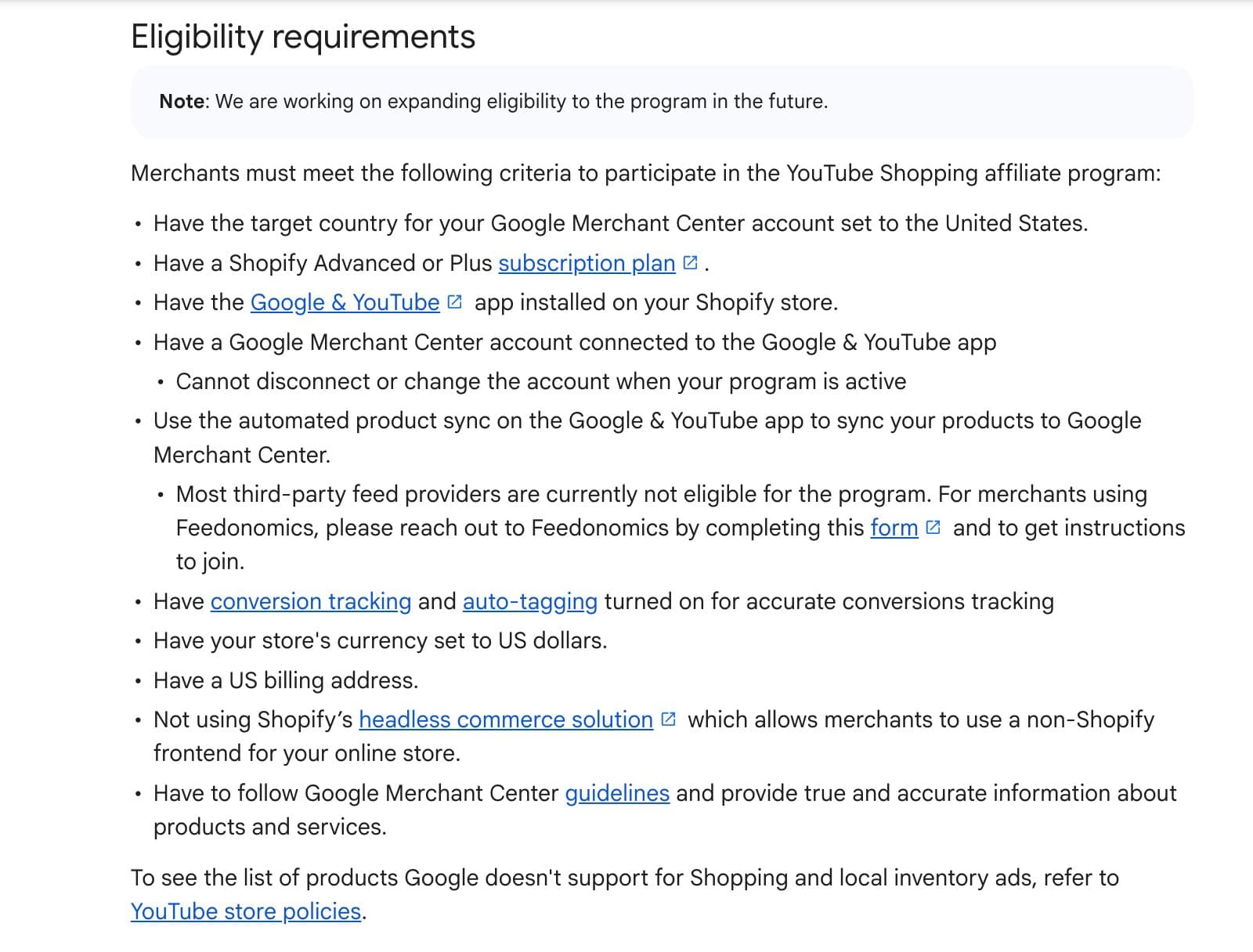
Read that list carefully. There are no subscriber requirements. No watch-hour requirements. No Shorts view thresholds. You don't even need a YouTube channel to run the affiliate program.
What you do need:
- Target country in Google Merchant Center set to the United States
- A Shopify Advanced or Shopify Plus subscription plan
- The Google & YouTube app installed on your Shopify store
- A connected Google Merchant Center account (which you can't change while the program is active)
- Automated product sync turned on (most third-party feed providers aren't eligible, though Feedonomics users have a workaround via their team)
- Conversion tracking and auto-tagging enabled
- Store currency set to USD, US billing address
- Not using Shopify's headless commerce solution
- Compliant with Google Merchant Center guidelines
Once you're in, the Shopify Google & YouTube app confirms participation directly:
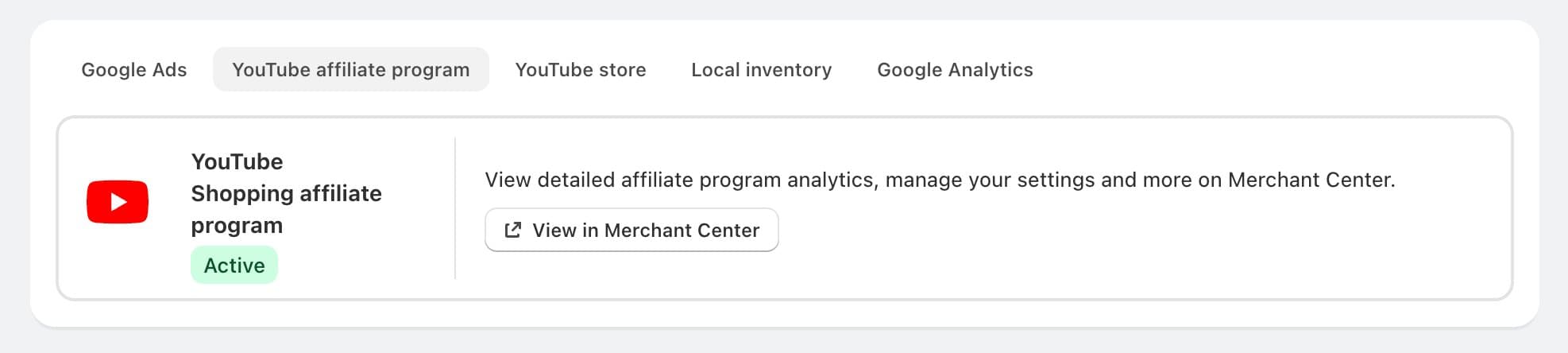
That's it. If you're a DTC brand on Shopify Advanced or Plus doing business in USD with a US billing address, your entire eligibility hurdle is setup, not channel metrics.
Why this distinction matters so much
We've seen brands delay launching YouTube Shopping by 6+ months because they thought they needed to build their brand channel to 500 subscribers first. They were wrong on two counts:
- The affiliate program doesn't require a brand channel at all. You can launch today and have creators tagging your products before your own channel has its first subscriber.
- Even if you did want your own channel to tag products (the YouTube Store path), 500 subscribers is achievable in 30–60 days for most DTC brands with real product and real content. It's not the blocker brands assume it is.
If you're a Shopify Advanced or Plus brand selling in the US and you haven't launched YouTube Shopping, the only thing between you and your first creator-driven sale is 60 minutes of setup and a commission rate decision. That's it.
The YouTube Store path (separate, higher bar)
For completeness: if you do want to tag products on your own brand channel (the YouTube Store), you need to be in the YouTube Partner Program. As of March 27, 2026, YouTube expanded the Partner Program to creators with:
- 500 subscribers
- 3 public uploads in the last 90 days
- 3,000 watch hours in the last 12 months OR 3 million Shorts views in the last 90 days
This unlocks Shopping alongside other monetization features. Note: Shopify's own documentation still cites a 1,000-subscriber floor for the integration specifically, so plan for 1,000 if you want to run your own channel alongside the affiliate program. The affiliate program itself doesn't care.
A few more eligibility realities worth flagging
- Countries for the affiliate program are currently limited to 12 markets: US, South Korea, Indonesia, Thailand, Vietnam, Malaysia, Philippines, India, Singapore, Brazil, Taiwan, and Japan. UK, Canada, Australia, Mexico, and EU are not yet included.
- Embedded checkout (where the purchase completes inside YouTube) is live in the US via Shopify and South Korea via Cafe24. Every other market redirects to your store.
- Prohibited product categories include alcohol, tobacco, firearms, recreational drugs, adult content, counterfeit goods, and a few others. Restricted categories requiring approval include supplements (Google's "unapproved supplements" label catches a lot of DTC wellness brands), CBD (effectively blocked), skin-lightening products, prescription pharma, and extreme weight-loss claims.
- Headless Shopify setups are blocked from the merchant affiliate program. If you're running a custom frontend on top of Shopify, you'll need to either move to a standard Shopify theme or set up a parallel storefront for the affiliate program.
If you're unsure whether your category or setup qualifies, that's a 15-minute conversation.
Book a 30-minute YouTube Shopping audit. We'll walk your category, catalog, and creator fit in one call.
The setup walkthrough
Assuming you qualify, here's the end-to-end setup. We'll cover the affiliate program path first (since that's what most brands should start with) and flag the additional steps for running your own brand channel.
Phase 1: Get your Shopify store ready
Before you touch YouTube, confirm:
- Your Shopify plan is Advanced or Plus.
- Your storefront has a working refund policy, terms of service, and contact page linked in the footer. Google Merchant Center will reject catalogs without these.
- You're not running a headless setup.
- Your store currency is USD and your billing address is US-based.
- You have a Google account that will own the Merchant Center and YouTube connections. This should be a business account, not a founder's personal Gmail.
Phase 2: Install the Google & YouTube app
Inside your Shopify admin, install the Google & YouTube app from the Shopify App Store. This is the channel that connects Shopify to Google Merchant Center and, once eligible, surfaces the YouTube affiliate program and YouTube Store options.
The app will walk you through connecting (or creating) a Google Merchant Center account, syncing your product catalog, and verifying your domain.
Phase 3: Get products approved in Google Merchant Center
Once synced, Google reviews each product against Merchant Center guidelines. Expect 2–5 business days for initial review. Watch for rejections on:
- Missing GTIN/MPN on applicable categories
- Image backgrounds (plain white works best)
- Pricing mismatches between your feed and your landing page
- Restricted category flags (supplements, beauty with strong claims)
Fix rejections as they come in. You can't opt into the affiliate program until your catalog is approved.
Phase 4: Enable the YouTube Shopping affiliate program
In the Google & YouTube app, navigate to the YouTube affiliate program tab and click through to Google Merchant Center to manage settings. In Merchant Center, you'll:
- Set your default commission rate (more on this below)
- Define any custom creator lists with elevated rates
- Configure attribution window (30 days is the default; extend where possible)
- Enable conversion tracking and auto-tagging if not already on
Once activated, your products become available to eligible creators through the YouTube Affiliate Hub. Creators can browse, filter, and add your products to their videos without any further approval from you (unless you use custom lists).
Phase 5: (Optional) Connect your own brand channel
If you also want to tag products on your own YouTube channel (the YouTube Store), you'll need to:
- Apply to and get accepted into the YouTube Partner Program (500 subs expanded YPP, or 1,000 for Shopify's documented floor)
- Accept the Shopping Commerce Product Module terms in YouTube Studio
- Connect your Shopify store in Studio → Earn → Shopping
- Configure your Store tab, Collections, and pinned products
This is a parallel track. You don't have to do it to run the affiliate program. But if you already produce content, or you have a founder who wants to tell the story, running both multiplies your reach.
Phase 6: Tag products (if you run your own channel)
Once your store is connected, you can tag products in:
- Long-form videos. Up to 60 products, with timestamped tags for the moments they're discussed. Timestamp + description links drives 43% more product clicks than description-only.
- Shorts. Via Product Stickers (added in the mobile app only; desktop can't do this). The first tagged product becomes the on-screen sticker.
- Livestreams. Up to 30 products, pinnable from the Live Control Room.
Every tagged product re-triggers a review cycle if you edit the video after publish. Tag carefully.
Phase 7: QA everything
Test the experience on mobile, desktop, and (if you can) CTV. Check that product cards load, that pricing matches, that tags appear at the right timestamps, and that the redirect to your store (or embedded checkout, if enabled) works end to end. Most bugs surface on mobile. Check there first.
Setting up your first affiliate program
Getting turned on is step one. Running the program well is step two. Here's what that actually looks like. If you'd rather have a team run this end-to-end, that's what we handle at Feels Like Friday.
What commission rate to set
The single most important strategic decision is your default commission rate, because it determines whether creators find you, pick you, and keep tagging you.
Category benchmarks based on 2026 competitive data:
- Beauty: 15% is the floor. 20% for holiday pushes. 25%+ for invite-only tiers on your best creators.
- Supplements / wellness: 18–20% default; 25% top tier.
- Outdoor / recreation: 8–10% default; 12–15% top tier. Extend attribution window to 45 days where possible, since the consideration cycle is longer.
- Fitness apparel: 10–12%. Equipment: 6–8% (the AOV supports lower rates).
- Home goods / kitchen: 10–12% default; 15% for invite-only.
- Pet: 12–15%.
Google's own data says the median commission rate in the YouTube Shopping affiliate program is around 15%, with the bottom quartile at 10% or less. Below 10% on a considered-purchase category and you'll be invisible. Creators can sort the Affiliate Hub by rate, and you'll rank below competitors who pay better.
One critical note on structure: your custom creator lists can only pay higher than your default, not lower. Set your default carefully. You can't tier down to a smaller number for less-valuable creators, so the default needs to be sustainable as your baseline.
Attribution window
The default is 30 days, last-click. For considered purchases, extend to 45 days wherever your retailer tooling allows. Outdoor especially. The decision cycle on a $300 tent doesn't fit in 30 days.
There's no view-through attribution, which means a creator video that drives consideration but not an immediate click won't get credit for a sale that happens later via a different channel. This is a real limitation. The workaround is running geo holdout or creator-cohort holdout tests to measure true incremental lift rather than just last-click attributed revenue.
Finding creators (and letting creators find you)
The Merchant Center affiliate dashboard shows you creators who have already driven traffic to your site (50+ views), which is useful reactively. But it's not a proactive discovery tool.
For proactive outreach, most DTC brands we work with layer on one or more of:
- CreatorIQ (enterprise, deep integrations)
- Impact.com (integrated with YouTube's program directly)
- GRIN / Aspire.io / Modash (mid-market)
- SARAL (Shopify-native, lightweight)
- Superfiliate (purpose-built for Shopify + affiliate layering)
Shopify Collabs used to be a natural complement, but it's been closed to new creator signups since 2025. Don't plan around it.
Outreach cadence: warm before you pitch. Engage with creators' content for 2–3 weeks before sending anything. When you pitch, lead with fit ("we saw your pack review on the Osprey Aether and thought our framesheet would be interesting to your audience"), not commission.
Disclosure and compliance (the part that matters legally)
Every creator tagging your products must disclose the relationship clearly and conspicuously. YouTube's built-in "paid promotion" toggle is not sufficient on its own. The FTC expects verbal and visual disclosure that's unmistakable.
FTC fines for disclosure violations can run up to $51,744 per violation. You're not personally liable for a creator's non-disclosure, but the brand gets named and the program gets scrutinized. Build disclosure language into every brief you send.
Tracking performance
Performance data lives in four places:
- YouTube Studio → Earn → Shopping (per-video and per-channel clicks, sales, estimated revenue)
- Google Merchant Center → YouTube Affiliate tab (creators, content, products, audience demographics)
- Shopify → Analytics → Sales by Traffic Source (UTM-tagged to isolate YouTube)
- GA4 (referral traffic, assisted conversions)
For larger brands running multi-channel attribution, Northbeam, Triple Whale, or Rockerbox will stitch YouTube Shopping data into a broader picture.
What to expect in the first 90 days
Most brands launch YouTube Shopping, don't see six-figure months in week three, and declare it a failure. This is like planting a tree, looking at it 10 days later, and concluding it doesn't work.
Here's what the trajectory actually looks like for a DTC brand in a considered-purchase category with a $75+ AOV and real product-market fit:
Days 0–30: Foundation. Setup is complete. Your commission rate is competitive. You've identified 15–25 target creators and started conversations with 10–20. You may have your first 1–3 creator videos live. Revenue expectation: under $10K. Don't panic. Videos take time to rank and circulate.
Days 30–60: First signal. You have 5–10 creator videos live and building views. Tagged product CTR should be 2–5% on good fits. You're starting to amplify the best-performing organic videos with paid YouTube Ads (a proven multiplier). Revenue expectation: $5K–$50K monthly run-rate.
Days 60–90: The shape emerges. 25+ active creators. The power law becomes visible. Typically the top 10–20% of your creators drive 70–80% of your GMV. You're running your first incrementality test (geo holdout or creator-cohort holdout) to measure true lift. Revenue expectation: $20K–$150K+ monthly run-rate.
By month 12, strong-fit brands typically see YouTube Shopping at 5–15% of total DTC revenue. SharkNinja has publicly cited DTC at roughly 10% of overall sales, and YouTube is a significant contributor to that mix.
Content that converts in the first 90 days
Rank-ordered by conversion potential for considered-purchase categories:
- Head-to-head comparisons ("X vs. Y")
- Solo in-depth reviews (10–20 minutes)
- "Best of" or gift guide roundups (timestamped so your product gets its own moment)
- Tutorials and how-tos with product demonstration
- GRWM / full routine / daily use (beauty, supplements, fitness)
- Unboxings
- Dupes comparisons (beauty)
- Day-in-the-life (outdoor, fitness)
- Gear breakdowns ("what's in my pack")
- Long-form documentary / story-driven content
- "6-month update" authenticity plays
Avoid ad-first content. Viewers click on YouTube creators because they trust them. Content that reads like a 30-second commercial stuffed into a 12-minute video converts worse than a genuine, balanced review, even a mildly critical one.
Measuring what matters
Benchmarks worth calibrating against:
- Tagged product CTR: 2–5% is healthy. Under 1% means bad creator-product fit. Over 5% is top-tier.
- Click-to-purchase conversion rate: 1.5–3% for most considered purchases; 5–8% for beauty and supplements with strong demo.
- Shorts Product Stickers: 40% more clicks than the old Shopping button.
- Timestamps + description links on long-form: 43% more product clicks than description-only.
The attribution limitation to keep front-of-mind: YouTube Shopping is last-click, 30-day by default, and click-only (no view-through). Agentio's data (40% of views and 30% of clicks happen more than 30 days after publish) means standard last-click attribution with a 30-day window chronically under-credits YouTube Shopping.
If you're running YouTube alongside Meta, and you're measuring both on 30-day last-click, you'll systematically overvalue Meta and undervalue YouTube. The clean answer is incrementality testing: geo holdouts, creator-cohort holdouts, or media-mix modeling, run quarterly. The messier but practical answer is to extend your attribution window to 45–60 days for YouTube specifically and to run blended analyses that include assisted conversions.
First-90-day KPI targets
For a considered-purchase DTC brand at $75+ AOV:
- 25+ creators with your products tagged by Day 90
- Tagged product CTR: 2–4%
- Click-to-purchase CR: 1.5–3%
- CPA 25–50% below your blended Meta CAC
- Commission spend: 10–15% of attributed revenue
- YouTube Shopping at 2–8% of DTC revenue by Day 90; 5–15% by Month 12
Common pitfalls
The mistakes we see brands make over and over again, roughly in order of cost:
- Treating the affiliate program as gated by channel metrics. As covered above, the affiliate program doesn't require a channel. Brands that wait six months to "hit 500 subscribers" have missed six months of compounding.
- Setting commission below category median. If beauty pays 15% and you pay 10%, you will not be seen. Creators sort by rate.
- Picking creators by subscriber count. A 30K-subscriber creator in your exact niche outperforms a 300K-subscriber generalist on CTR and CR every time.
- Shorts-only strategy. Shorts are for discovery. Long-form is where considered purchases close. Running one without the other leaves money on the table.
- Ad-first creative briefs. If your brief reads like a script, creators either won't take it or will produce content that underperforms.
- Ignoring search intent in titles. YouTube is the #2 search engine in the world. Titles matter. "Review: [Product]" outperforms "My honest thoughts" by a lot.
- Expecting TikTok Shop velocity. YouTube Shopping compounds. It does not spike. Patience is an asset here.
- Siloing paid, organic, and creator. Kantar has shown that YouTube organic + paid amplification of the same creator content drives 2.3× long-term ROAS versus running either alone.
- Ignoring branded search leakage. When creator videos drive viewers to search your brand name, and competitors bid on your terms in Google Ads, you lose demand you already paid for. Defend your branded SEM.
- Treating YouTube Shopping as a one-quarter campaign test. It's a channel, not a campaign. Campaigns end. Channels compound.
It's a channel, not a campaign. Campaigns end. Channels compound.
The window is open.
Most DTC brands in outdoor, beauty, fitness, supplements, and home goods haven't set up YouTube Shopping yet. The ones that have are building a library of search-ranked, creator-endorsed content that will keep producing revenue long after their paid ad campaigns end.
In 2027, when in-app checkout is fully rolled out and YouTube Shopping GMV has likely grown another 5× on top of where it is now, the brands that own the category search terms, the creator relationships, and the content library will be very hard to dislodge.
The brands that start setting up in Q3 2027 will be two years behind.
The eligibility for the affiliate program is simpler than most brands think. The setup is 60 minutes of work. The compounding starts on day one.
If you're a DTC brand in a considered-purchase category doing $1M+ in annual revenue and you haven't started, the best time to start was 18 months ago. The second-best time is this week.
Book a 30-minute YouTube Shopping audit with Feels Like Friday. We'll walk through your eligibility, your catalog, your creator fit, and a realistic 90-day revenue projection.
Feels Like Friday is the YouTube Shopping agency for DTC brands. We handle creator intelligence, catalog optimization, affiliate program architecture, content strategy, and attribution dashboards, end-to-end and performance-aligned. Learn more about what we do.