If you just activated the YouTube Shopping affiliate program and you're staring at the commission rate field trying to decide what to put in, this is for you. Two variables determine whether your program actually works: the rate you pick, and how you handle the 30-day attribution window.
Most brands guess on the first and ignore the second. Both are mistakes. Your commission rate is the most visible signal you send to creators (they sort by it, and a Chrome extension literally suggests higher-paying competitors to them). The 30-day window, left unmanaged, quietly sets up a scenario where you pay YouTube, Meta, and Google for the same conversion.
This guide covers the unit-economics math that tells you the rate you can afford, the strategic framing that tells you the rate you should pay, and the attribution management that protects both. A calculator is embedded partway through so you can work through your own numbers.
Start here: Why YouTube Shopping is a category-defining channel · The click-by-click Shopify + GMC setup walkthrough
Commission rate is the discoverability signal
Google publishes exactly one benchmark for YouTube Shopping commission rates, and it's the only number you need to anchor on. Per Google Merchant Center help docs: the median commission rate across the program is around 15%, and the bottom quartile is 10% or less.
Read that carefully. Google is telling you, in their own documentation, that below 10% puts you in the bottom 25% of merchants. It's a public notice that low-paying brands get filtered out.
The structural reason is simple. Creators decide who to tag based on what they earn per video. A creator who drives 30 sales at a $20 AOV with a 3% commission earns $18. The same 30 sales at 15% earns $90. At 20%, $120. For a creator choosing which of dozens of brands to feature in a review, that's the entire decision.
This is why the most common complaint in creator forums isn't "YouTube Shopping doesn't work." It's "I drove real sales and got paid nothing." The frustration is a math problem. Brands paying 2–5% on low-AOV products aren't building a program. They're posting a sign that says "not worth your time" in the one place creators look.
What creators actually see when they browse your brand
The YouTube Shopping Affiliate Hub lives inside YouTube Studio under Earn > Shopping. It's where creators discover merchants, check commission rates, see if samples are available, and tag products. Sort options include alphabetical and (the important one) highest commission.
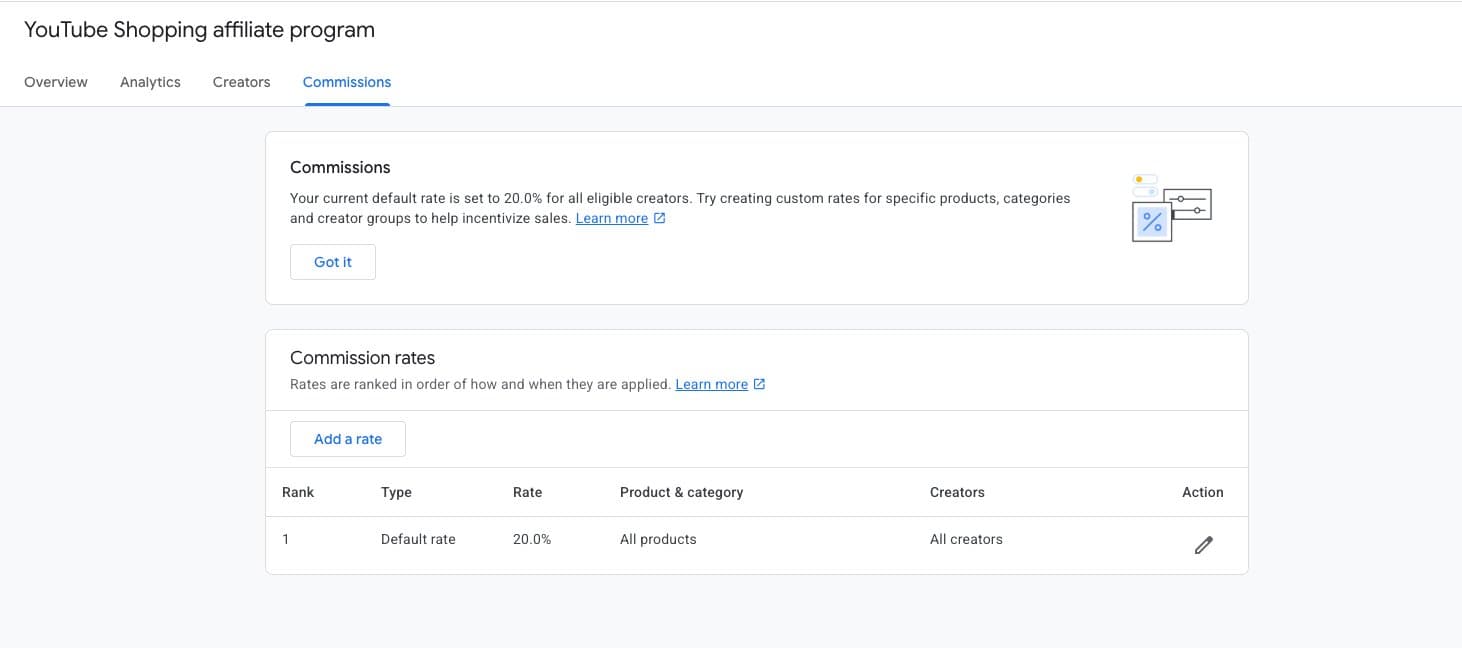
Creators can also install the official YouTube Shopping Chrome extension, which lets them browse any retailer's website and save products directly into their Studio library. The extension surfaces commission rates in real time, and (this is the part most brands don't know) recommends similar products with higher commission rates.
That means a creator browsing your product page with the extension installed may be shown a competitor paying more, before they tag you.
The rate isn't just what you pay. It's what determines whether you get tagged in the first place.
The rate isn't just what you pay. It's what determines whether you get tagged in the first place.
The other signal creators use is rate structure. Fixed, flat, never-adjusted programs look generic. Programs with tiered rates, seasonal boosts, and sample availability look actively run. Those are the programs top creators tag first.
Finding your ceiling: the unit economics
Your commission rate is ultimately a margin decision. You can't pay creators money you don't have, and you shouldn't pay so much that you break your blended margin structure. Here's the formula chain.
Start with AOV. From AOV, subtract:
- Cost of goods sold (COGS as a percentage of AOV)
- Outbound shipping per order
- Payment processing (typically around 2.9% + $0.30 on Shopify Basic, lower on Advanced and Plus)
- Fulfillment (3PL pick-and-pack, usually $4–$8 per order)
- Returns reserve (your return rate times AOV times the portion of returned product that can't be resold at full price)
What's left is your contribution margin, often called CM2. That's the ceiling for all variable acquisition cost, including commission, paid CAC, and discount drag. The max commission you can afford to pay is CM2 minus whatever first-order profit you want to retain.
Three ways to think about that last step:
- Break-even on first order. You retain nothing. Commission equals full CM2. Only safe if your repeat-purchase rate and LTV are strong enough to justify losing money on acquisition.
- Retain a target margin. You pick a percentage of AOV to keep as first-order profit (15%, 20%, 25%). Commission equals CM2 minus that retained profit. This is the standard approach.
- LTV-weighted. You layer in expected incremental gross profit from repeat purchases. Only reliable if you have clean cohort data.
Most brands running their first YouTube Shopping program should start with option 2 and a conservative retained-margin target. You can always tier up for top creators (custom lists can only go higher than default, never lower). You cannot lower your default without breaking trust with creators already tagging you.
Work through your own numbers
The calculator below walks you through the full chain. Input your AOV, category defaults, and retained-margin target, and it shows you the maximum commission you can afford and what rate puts you above Google's 15% median anchor. Use it before committing to a default, and again any time you're considering a custom rate for a creator list.
YouTube Shopping Commission Rate Ceiling
The 30-day attribution window, and the problem nobody talks about
YouTube Shopping's affiliate program uses a 30-day last-click attribution window. If a customer clicks a creator's product tag and purchases within 30 days, the creator gets credit. For Shopify merchants, this isn't a setting you can change in the Merchant Center UI. Treat it as fixed.
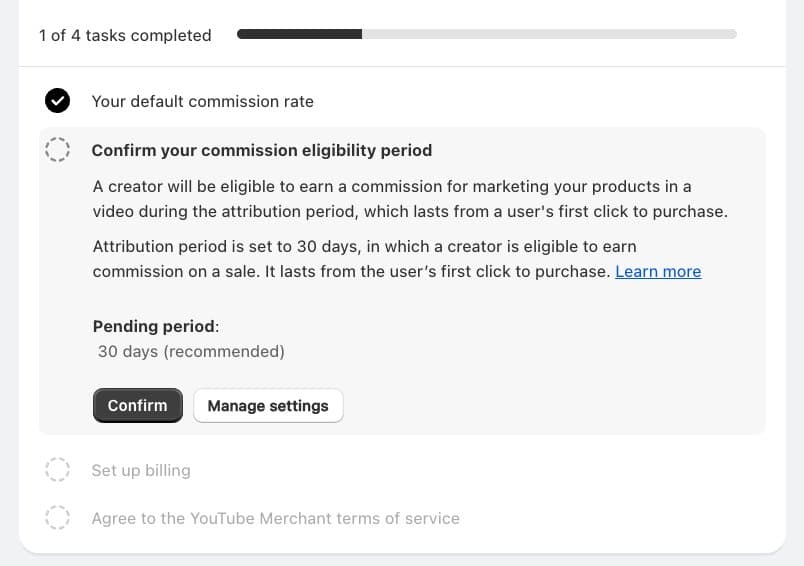
Thirty days is a long window relative to other affiliate programs. It's a good window for YouTube specifically because YouTube is a discovery channel, and viewers often watch a review, do other research, and come back weeks later. The window matches actual buying behavior.
The problem isn't the window itself. The problem is what happens inside it.
Here's the pattern. A customer watches a creator's review on Thursday. They click the product tag and land on your site. They don't buy. Two days later, your Meta retargeting campaign serves them an ad for the same product. A week later, they convert through the Meta ad.
At that moment, three things happen:
- The YouTube creator gets commission (last-click within 30 days)
- Meta claims the conversion through its pixel
- If the customer did branded search along the way, Google Ads claims it too
You're paying YouTube, paying Meta CPM to re-serve an audience YouTube already warmed up, and possibly paying Google to defend branded search introduced by YouTube. Same sale. Three attributions. Three costs.
This is what operators call "channel collision," and it's why the 30-day window makes some brands nervous when they first activate. Left unmanaged, your YouTube Shopping program looks like it's cannibalizing paid media. In reality, it's being cannibalized by paid media.
The reframe: YouTube is where the journey starts, not ends
The reason the triple-payment scenario feels so frustrating is that most attribution tools treat YouTube as one channel among many. The data says it isn't.
Google's own research with BCG (2025, n=10,117) found that 50% of consumers said digital video made them aware of products or brands, and 45% said it helped them choose which product to buy. Think with Google data shows 87% of US shoppers feel they get the highest-quality information about products when browsing on YouTube.
More directly: Crealytics' analysis of multi-touch conversion paths involving Google's Demand Gen placements found YouTube appeared at the end of the path in only 14% of conversions. The other 86% of the time it appeared at the beginning or middle. Haus Analytics, across 190 incrementality tests, found YouTube drove 3.4× more incremental lift than standard attribution reported.
In plain terms: YouTube is almost always an introducing channel, not a closing one. When creators tag your product, they're creating the discovery moment. The paid retargeting that follows isn't creating the sale. It's capturing a sale YouTube already started.
You're not losing money to YouTube by paying commission. You're losing money to paid retargeting that's taking credit for sales YouTube already started.
That's the reframe. You're not losing money to YouTube by paying commission. You're losing money to paid retargeting that's taking credit for sales YouTube introduced. This is precisely the pattern the YouTube SEO guide makes visible with the multi-surface citation data.
Exclusion strategy: protect the economics
Once you see the pattern, the fix is to stop retargeting your own YouTube-originated traffic. The principle:
- Tag YouTube Shopping traffic with consistent UTMs so you can identify it downstream
- Build customer audiences in Shopify (by UTM-tagged orders) and Meta (via Custom Audiences of YouTube Shopping clickers and purchasers)
- Add those audiences as exclusions on Meta retargeting campaigns and Google Ads remarketing lists
- Set exclusion windows of 60–90 days, not just 30
The 60–90 day recommendation is the piece most brands get wrong. YouTube's attribution window is 30 days, but actual purchase decision latency for considered-purchase categories is longer. If your exclusion window is 30 days but your customer buys on day 42, the paid channel claims it and you're back to triple-paying.
This isn't about penalizing Meta or Google. It's about letting each channel do what it's actually doing. YouTube is the discovery layer. Paid social and paid search are for customers YouTube hasn't touched yet, which is a larger audience than most brands realize. Running both without exclusions makes paid channels look better and YouTube look worse. The right exclusions let the real picture show up in your dashboards.
Implementing this cleanly requires synchronized audiences across Shopify, Meta, Google Ads, and your attribution stack. It's a core part of the YouTube Shopping stack we manage and one of the most common issues we see on program audits. The post-click companion piece on this is the CRO guide, which covers the attribution measurement side in detail.
Structure your rates with the lock-in rule in mind
One last structural point. In YouTube Shopping, custom creator list rates can only go UP from your default. You cannot lower the default for specific creators, and you cannot lower it across the board without affecting everyone already tagging you.
Set your default with that constraint in mind. Conservative default, tiered up for top performers, seasonal boosts during launch windows or BFCM. A default above your long-term affordable rate locks you into margin pain. A default below the bottom-quartile anchor makes you invisible.
The practical sequence: set a default that clears Google's 10% bottom quartile and leaves room for 5 to 10 points of upward tier movement for your best creators. Run it for 60–90 days, see which creators are actually driving sales, and build a custom list at a higher rate for top performers. Boost seasonally. Never lower the default once creators have signed on.
Closing: the rate is a position statement.
The commission rate you set is a statement about how you think about creator partnerships. A floor-of-category default says you want the program to exist but aren't committed. A median-plus default with tiered top-performer rates says you're building a channel. Creators can tell the difference before they tag their first product.
The brands building durable YouTube Shopping programs in 2026 get two things right: they pay competitively inside the constraints of their unit economics, and they manage the 30-day window so creators are actually rewarded for the demand they generate.
The cost of getting it wrong is paying three channels for one sale, on repeat.
The math is learnable. The exclusion strategy is solvable. The cost of getting it wrong is paying three channels for one sale, on repeat.
Book a 30-minute commission audit with Feels Like Friday. We'll work through your unit economics, your current rate vs. category benchmarks, and your attribution-window exclusion setup.
Setup walkthrough (Shopify + GMC) · CRO tactics for YouTube Shopping · Creator content strategy · YouTube SEO for DTC brands
Feels Like Friday is the YouTube Shopping agency for DTC brands. We build commission structures, creator tiers, and attribution dashboards that make creator commerce actually compound. Learn more about what we do.